Buscar este blog

Mostrando entradas con la etiqueta facebook. Mostrar todas las entradas

19 de octubre de 2020

Guía tamaños de las imagenes para redes sociales - Facebook e Instagram

La siguiente infografía contiene información resumida de los diferentes formatos y tamaños para las principales redes sociales como Facebook, Instagram. Es una guía esencial para el Comunitty Manager.

Facebook
  • Facebook profile picture size: 180 x 180
  • Facebook cover photo size: 820 x 462
  • Facebook link image size: 1200 x 630
  • Facebook image post size: 1200 x 630
  • Facebook event image size: 1920 x 1080
  • Facebook video size: 1280 x 720
  • Maximum Facebook video length: 240 minutes
  • Facebook ad size: 1200 x 628
  • Facebook video ad size: 1280 x 720
  • Facebook Story ad size: 1080 x 1920
  • Facebook group cover image size: 1640 x 922
  • Facebook messenger image ad size: 1200 x 628
Instagram

  • Instagram profile picture size: 110 x 110
  • Instagram photo sizes: 1080 x 1080 (square), 1080 x 566 (landscape), 1080 x 1350 (portrait)
  • Instagram Stories size: 1080 x 1920
  • Minimum Instagram video sizes: 600 x 600 (square), 600 x 315 (landscape), 600 x 750 (portrait), 600 x 700 (Carousel video dimensions)
  • Maximum Instagram video length: 60 seconds
  • Minimum Instagram image ad size: 500 pixels wide
  • Instagram photo thumbnails: 161 x 161
  • Instagram ads size: 1080 x 566 pixels (landscape), 1080 x 1080 pixels (square)
  • Instagram IGTV video size: 1080 x 1920

23 de abril de 2012

Medidas de las imagenes en Facebook - nuevo timeline

Desde el 30 de marzo del 2012, Facebook instaló en los las páginas de empresa el nuevo Timeline. Hay detalles interesantes a considerar con las imagenes. Si optamos por utilizar las que ya tengamos en nuestra galería, hay que tener en cuenta que es posible que al adaptarse al nuevo formato pierdan resolución, se vean mal etc. Para evitar ésto, adjunto los tamaños de los diferentes formatos en píxeles y en ancho x alto:
  • Imagen de portada: 851 x 315.
  • Imagen de Perfil: 180 x 180.
  • Imagen de app: 111 x 74.
  • Miniatura: 32 x 32.
  • Imágenes de los post del muro: 404 x 404.
  • Imágenes destacadas de los post del muro: 843 x 403.
El siguiente gráfico ilustra la posición de todas y cada una de ellas:

28 de noviembre de 2011

Descubre cómo seleccionar a todos tus amigos de Facebook con un sólo click

Seguro que muchas veces has querido compartir con tus amigos de Facebook un grupo o una página en especial y cuando lo has ido a hacer has tenido que ir uno por uno marcando a los amigos que quieres enviárselo y si por ejemplo tienes 500 amigos la verda es que se hace bastante pesado (si tienes más ya ni te cuento).
Pues desde hoy eso se va a acabar, y te voy a enseñar un método muy sencillo con el que con tan sólo un click podrás seleccionar de golpe a todos tus amigos.
Como ejemplo vamos a poner que quieres compartir con tus amigos la página en Facebook de Marketing Surfers, pues tendrías que darle a “Sugerir esta página a mis amigos” y se te abrirá una venta con todos tus amigos donde podrás irlos marcando.
pagina-facebook-marketing-surfers

En el momento en el que ya tengas abierta la ventana con tus amigos debes poner en la barra de direcciones del navegador el código integro que te detallo a continuación y luego darle a “Intro”:
javascript:elms=document.getElementById(‘friends’).getElementsByTagName(‘li’);for(var fid in elms){if(typeof elms[fid] === ‘object’){fs.click(elms[fid]);}}
barra-navegador
Inmediatamente verás como se han marcado el 100% de tus amigos y ya le puedes dar a enviar.

Fuente: http://www.juanmerodio.com/2010/descubre-como-seleccionar-a-todos-tus-amigos-de-facebook-con-un-solo-click/

Editor: Alex Rojas writes articles related with technology, social media and marketing. Sponsored by Costa Rica Hotels, Motor de reservas en linea and Travel to Costa Rica

24 de septiembre de 2011

Cambia tu perfil de Facebook en tres minutos

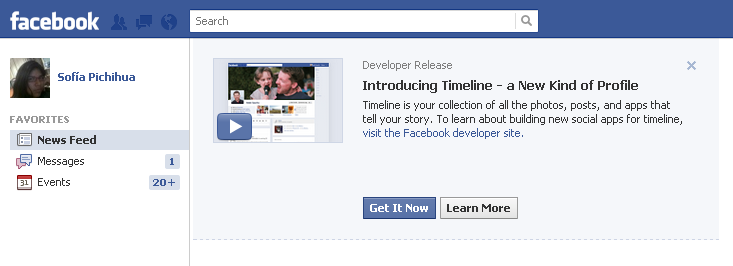
¿Listos para probar Timeline de Facebook? El rostro de Facebook es totalmente diferente: se destaca las historias y aplicaciones en la red social. Si quieres cambiar tu perfil no dejes de seguir estos pasos:
1. Ingresa a la página de Aplicaciones de Facebook Developers.  Debes hacer clic en Allow o Permitir. También debes ingresar un código captcha.
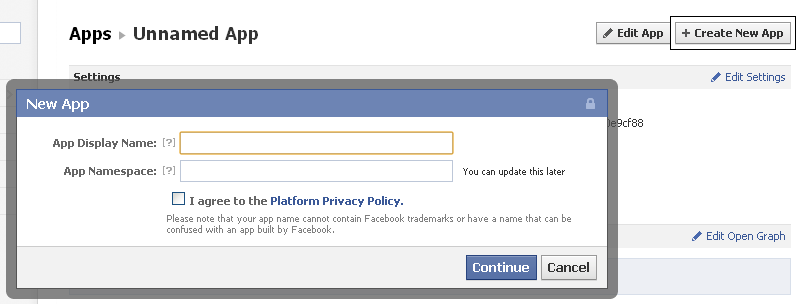
2. Haz clic en Crear una aplicación y llena los campos con tu nombre. En realidad, puede ser cualquier dato, pero el segundo campo no puede ser igual al de otros usuarios. Luego haz check en I agree… y luego en Continue.

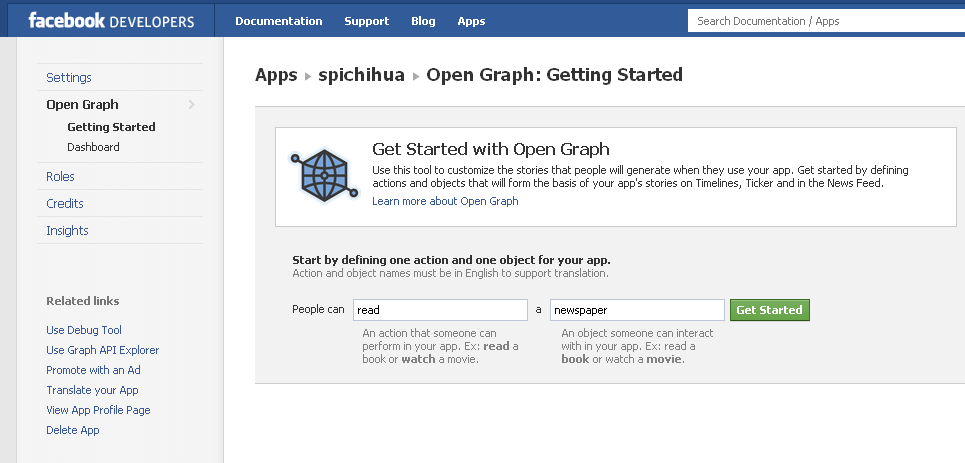
3. Se recargará la página y saldrá la opción Open Graph. Hazle clic:

4. Debes poner un verbo y un sustantivo. Yo elegí “read” (leer) y “newspaper” (periódico). Luego haz clic en “Get Started”

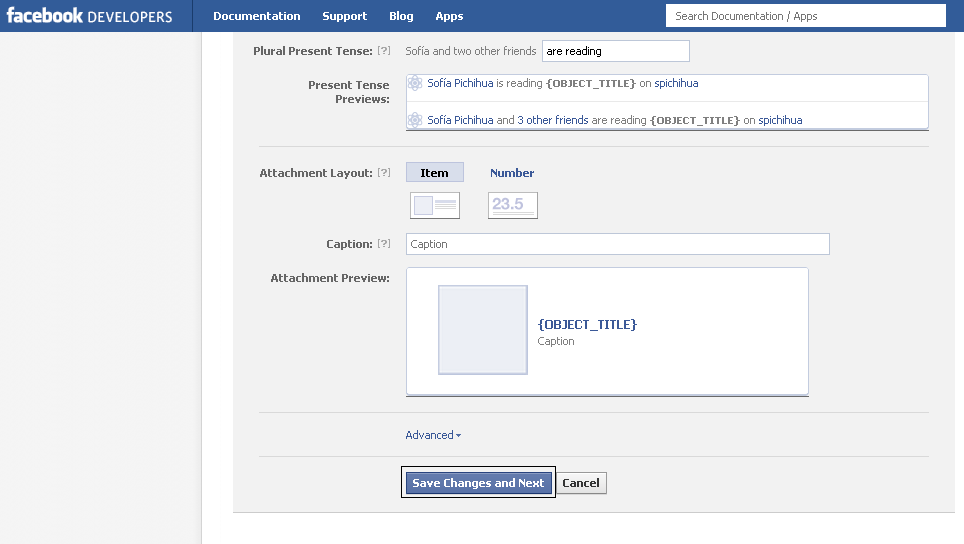
5. Haz clic en Save Changes and Next. Luego te aparecerá otra página y nuevamente haz clic en Next.

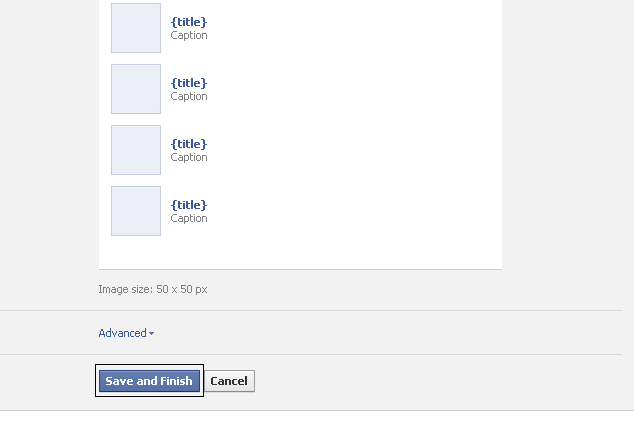
6. Finalmente haz clic en Save and Finish.

7. Si recargas la página de Facebook.com podrás ver el botón “Get it now”.

8. Si le haces clic, ¡tu Facebook estará renovado!

Actualización: Algunos han tenido problemas pues les pide un código de verificación de su móvil o tarjeta de crédito. En el Perú y otros países de Latinoamérica este mensaje nunca llegó. En ese caso, se puede probar: 1) Agregar/modificar el número teléfono antes de seguir estos pasos o 2) verificar la tarjeta de crédito. La segunda opción resulta más efectiva, pues el proceso de confirmación no tarda más de dos minutos.
Vía TechCrunch
Fuente: http://www.clasesdeperiodismo.com/2011/09/22/cambia-tu-perfil-de-facebook-en-tres-minutos/

15 de agosto de 2011

Mostrar quién es el administrador o propietario de una página de Facebook

Si alguna vez te has preguntado (como yo y algunos cuantos miles más) ¿cómo mostrar quién es el administrador, propietario o creador de una página de fans (o comercial) de Facebook?, esto te puede interesar.
Una de las nuevas funciones en los recientes cambios en las páginas de fans de Don Facebook permite hacer público quién es el administrador de la página de manera que se muestre en el margen izquierdo. Es opcional, así que no se preocupen aquellos administradores o creadores que prefieren mantener su anonimato.
Veamos cómo activar y desactivar la opción:
1.- Ve a “Editar la página” (arriba a la derecha):
Del post mostrar propietario pagina fans
2.- En la página de edición, haz click en “Páginas destacadas”:
Mostrar admins de páginas de fans
3.- En páginas destacadas encontrarás 2 opciones, la primera “Me gustan” (esta es otra nueva función que te permite elegir hasta 5 páginas que “le gustan a tu página” para que aparezcan en lado izquierdo de manera rotatoria. Por ejemplo, si te gustan (bueno, si le gustan a tu página) 50 páginas, con esta opción se mostrarán las páginas que has elegido).
Pero sigamos con nuestro tema, ve a la segunda opción “Propietarios de Páginas” y haz click en “Editar los propietarios de páginas destacados”:
Mostrar creadores de paginas de fans
4.- En la siguiente ventana selecciona los administradores que quieras que se hagan públicos:
Quien es el administrador o propietario o creador de una pagina de fans de facebook
5.- Haz click en “Guardar” y te aparecerá algo así:
Nueva funcion mostra quien es el propietario de una pagina
5.- Y ya está, ve a tu página y comprueba que aparece el administrador o propietario en la parte izquierda:
Nuevos cambios facebook
Para que veas como se ve en vivo y a todo color ve a la página del directorio de Tuxpan, Veracruz en Facebook.
Para quitarlo sigue los mismos pasos, ve a “Editar los propietarios de páginas destacados”, quita la selección y guardas.
Puedes elegir más de un administrador o propietario, todos los que selecciones aparecerán en la parte izquierda de la página.
De las funciones nuevas de las páginas de fans de Facebook, ésta me parece muy interesante ya que permite a las páginas comerciales o de negocios hacer público a la persona (o una de las personas) que administra la página lo cual da un aspecto más personal en este canal de comunicación, es decir, las personas con las que se interactúa (fans) podrán ver que hay una alguien de carne y hueso detrás del logotipo, sobre todo para microempresas y Pymes, creo que puede ayudar en la estrategia de comunicación de su plan de marketing online.
Por otro lado, habrá administradores o propietarios de páginas que prefieran no hacerse públicos y es normal, imagínate, el administrador de la página de Coca Cola que tiene más de 23 millones de fans, si se hace público podría recibir tantas solicitudes en su perfil personal que en unos minutos podría llegar al límite de 5000 amigos :) (es un ejemplo extremo claro, y además Coca Cola tiene más de un administrador, pero no sé, podría ser interesante ver que pasa ¿no crees?), y por el contrario podría ser bueno para quienes quieren hacerse promoción y darse a conocer. También hay quienes prefieren separar su vida personal de la profesional, y con esta nueva opción no lo podrían hacer.
¿Qué te parece esta nueva función en las páginas de Facebook?, ¿Qué utilidad, ventajas o desventajas le encuentras?

Editor: Alex Rojas writes articles related with technology, social media and marketing. Sponsored by Costa Rica Hotels, Motor de reservas en linea and Travel to Costa Rica


25 de julio de 2011

The Most Powerful Secret In Facebook Ads

Yesterday we discussed the trick to growing a Facebook fan base — to place the like button everywhere, get folks to like everything, as treat your fan base like an email list. Now that you have the initial set of fans, here’s where the fun begins.

Facebook has 3 types of connection targeting: users who are fans, users who aren’t fans, and friends of fans. It’s this last option that is amazing– so awesome that I’m afraid public mention of it may cause Facebook to remove it. And that’s why we keep testing, plus don’t reveal all our tips, but I digress.
Let’s consider a poker site– the National League of Poker. When we target only fans of the page, Facebook gives us an audience of 2,060 people:
NLOP Direct Screenshot
The actual fan count is 2,894, but that’s because Facebook’s estimate are delayed and we’re automatically filtering by US 18+. By using the first connection targeting option, we can continue to nurture those folks who have become fans. As a marketer, you know that you want to say something different to folks who already know you versus those who don’t, right? So why is it that Facebook advertisers treat everyone the same? When you use the first connection option, you’re trying to move people from the interest stage to either desire or action. You should not be trying to generate awareness with these folks who are already fans. Note that how our messaging is quite different than “Learn how to play poker!”
If you already are a fan of the page, the like button won’t show up, by the way. It will just say “You like this ad/page”– and if you have other friends who like it, they’ll show up, too. Sometimes the unlike button shows- not sure what governs when it shows. There are so few advertisers that are sending traffic to Facebook pages and also using connection targeting that it’s hard to tell.
Finally, this is what you’ve been waiting for. The average Facebook user has 130 friends. So the 2,060 fans allow us to reach 304,800 people.
NLOP Friend Of Friend Screenshot
This particular example works out to 148 friends per fan. The larger the base, the smaller the number of friends per user. It’s partly that your initial users are more likely to be early adopters and have more fans in general. But it’s also that the more fans you have, the greater the chance of overlap between them, such that the unduplicated audience decreases. When you have over 500,000 fans, then your factor of reach vs fans may be only low double digits. While decreased reach may appear bad, this is actually VERY good, since it means that each time you show the ad, it’s showing MULTIPLE people below providing endorsements. Awesomeness on Facebook = maximizing PEER PRESSURE!
Consider an ad for a pizza restaurant that says they have the best pizza in town. Yawn. That’s what 99% of advertising is about– in fact, pretty much all advertising outside of Facebook is like this– we just tune it out. Now imagine the same ad, but below it, your friend says they like it. Might you trust the claim a bit more– perhaps even be more likely to drop in and order pizza the next time you drive by the place?
How do you think this may affect the CTR as well as the conversion rates?
What if we could say this to 304,800 people– showing each of them an ad that had their particular friend’s endorsement below it?
What if you got clever with your ad copy to make outrageous claims?
NLOP Chicken Icon
By the way, these are fake examples– you’ll have to see what you can get by Facebook’s ad review team. The winning psychology: if you’re doing retargeting (remarketing) on Google, then you can use similar ads in your direct fan and friends of fans (FOF) targeting. For example, if someone has abandoned their shopping cart, you can say “Hey, why didn’t you buy? Here’s 10% off now to make it worth your while!” And you can put a retargeting pixel on your Facebook page, but that’s something to discuss in a post by itself.
Now consider the reach you have when you multiply your fan base by 150 and hit each of those folks with ads that have endorsements attached. The Las Vegas metro has 606,460 people on Facebook.
Facebook Las Vegas Targeting Screenshot
UNLV has 14,151 fans of our page of their 3 Las Vegas stadiums. We can cover over 50% of Las Vegas Facebook users with an endorsed ad. Consider if you’re a dentist in a suburb of 100,000 people. You need only a fan base of 500 people to effectively dominate your town with endorsed (FOF) ads– to have more than 50% coverage of a geo-graphic area.
Now before you go crazy with FOF targeting, consider when it works and when it doesn’t:
  • B2B: Nearly a complete FAIL. Why? When you do FOF targeting for an electronics manufacturer targeting design engineers, you end up targeting that design engineer’s family and friends who are decidedly NOT interested in the latest data sheets on your 16 bit transformer assemblies. For B2B, use workplace and interest targeting to hit their place of employment and title.
  • Consumer products and entertainment: ABSOLUTELY! Targeting the friends of of your fans is highly likely to result in something interesting to them. Ask yourself what percentage of a user’s fans will be interested in their endorsement of a new movie, their favorite brand of soap, or whatever.
  • Local: This is the goldmine of Facebook ads. People’s Facebook friends tend to be people they see and interact with in real-life. There is a high likelihood that you can leverage that fan’s recommendation broadly across their friend base. You can make it even better by adding a geographic and age filter, so you’re not showing ads to old college alumni or children, depending on what your business does. BlitzLocal has asserted that Facebook is the sleeping giant of local, because of the wealth of trusted information available and effectiveness of targeting. We don’t believe this will replace Google, but rather, augment it.
By the way, users who are being hit with this targeting aren’t aware that the advertiser is doing so– unless you are as blatant as the example I’ve provided. The ad itself doesn’t show what targeting criteria was used to match them to the ad. Note to Facebook: this would be a cool feature– and it would assuage many of the privacy concerns, where users are afraid that anything they have on their profile or interactions on Facebook is fair game for ad targeting.
There is a third targeting option, which is to exclude folks who are fans. Negation targeting matters only when your fan base is large enough that you risk showing awareness ads to folks who are fans.
TYING IT ALL TOGETHER
Few people realize that Facebook plays at all points in the conversion funnel– they simplistically believe that Facebook is just display advertising with social elements, and that Google is for conversion. It’s true that Google is primarily demand harvesting and that Facebook is more towards demand generation.
Facebook Ads Funnel
(image courtesy of Facebook)
More accurately, because you can target whether people are totally new to you, are connected to someone who does know you, or knows you– that lets you separate out your messaging and conversion paths. Most marketers are familiar with the AIDA funnel (Awareness, Interest, Desire, Action). And you can see how clearly Facebook’s ad system allows you to hit people at each of these points.
Blitz Local Facebook Ad Funnel
Advertisers inherently understand that word of mouth has been the most powerful marketing vehicle– previously unmeasurable. These ad options on Facebook, which we’ve only superficially covered here, allow not only for the measurement of word of mouth, but the aggressive amplification of it. Social media is inherently about leveraging trust to promote your business.
Was it Mark Twain who said something like “The key to success is to be genuine…. Fake that and you have it made!” Seriously, when you have a solid brand, you get an amazing boost from advertising on Facebook– the investment you’ve made in your brand means that users are already aware of who you are, are more likely to like your page, and are more willing to endorse you– whether they know it or not.
In our next article, we’ll discuss the next phase of your Facebook campaigns– how to manage your pages effectively such that you build upon the principles we’ve discussed so far. What if your company has multiple brands and multiple products in multiple countries. Do you create one page for each combination of country, product, artist, and language? Maybe have one page per country and then separate tabs for each product, so local fans can interact? Or maybe one page per product with tabs by country? The answer is none of the above and we’ll explain why.

Dennis Yu is Chief Executive Officer of BlitzLocal, a firm specializing in the intersection of Facebook and local advertising. Mr. Yu has been featured in National Public Radio, TechCrunch, Entrepreneur Magazine, CBS Evening News, and other venues. He is an internationally sought after speaker and 
author on all things Facebook. BlitzLocal serves both national brands and local service businesses.

Editor: Alex Rojas writes articles related with technology, social media and marketing. Sponsored by Costa Rica Hotels, Motor de reservas en linea and Travel to Costa Rica

17 de junio de 2011

Facebook lanza nuevo servicio de llamadas telefónicas


El fenómeno de la inserción de las redes sociales en la vida cotidiana hace que la compañía de Mark Zuckerberg y otras empresas encuentren nuevos negocios, y ahora crearon el “número de Facebook”.

La punta de lanza de las empresas dedicadas a la tecnología y a las telecomunicaciones, encontraron en los últimos años un nicho para agrandar sus ya acaudaladas arcas.

Los grandes puntales de esta tendencia son las redes sociales, donde Facebook es líder, y por otro lado, pisan cada vez más fuerte las soluciones que tienen que ver con la conectividad móvil, de la mano de los smartphones y las novedosas tablets, terreno marcado por Apple, como uno de sus pioneros.

La noticia ahora llega de la mano de Telefónica de España, que junto a la red de redes, que acaban de lanzar una nueva opción a la hora de hacer una llamada telefónica: “el número de Facebook”.

La comunicación global fue dada por Telefónica Móviles de España, donde básicamente anunciaron el servicio “Facebook Number”. Se trata de un sistema que permite brindar llamadas avanzadas online a los usuarios que posean cuentas de Facebook.

Esto se puede concretar gracias a los servicios de telefonía de FonYou, un proveedor de servicios de telefonía en la nube. Una de las funciones que brinda el "número de Facebook", que seria en realidad un "segundo número", es que este nuevo número de teléfono se monta sobre la tarjeta SIM del celular.

Cabe destacar que este servicio es exclusivo para clientes que ya posean cuenta en Telefónica, y el “Facebook Number” se grava sobre la tarjeta SIM que el usuario tenga actualmente, sin que haya necesidad de cambiar nada, ni siquiera se necesita un teléfono dual SIM.

Este "segundo número" es el que Telefónica propone destinar para que el usuario de Facebook utilice con sus contactos, y que el número de celular quede libre para ser usado con llamadas de personas que no tengan perfil en la red social.

El servicio, por ahora, solo funciona en España, pero se prevé que llegue en el corto plazo a otras regiones. Se puede acceder a este servicio solo ingresando en el navegador: apps.facebook.com/segundalinea.


Editor: Cristian Segura writes articles related with technology, social media and marketing. Sponsored by Costa Rica Hotels, Motor de reservas en linea and Travel to Costa Rica

10 de junio de 2011

Naciones Unidas declara el aceso a Internet como un derecho humano

La Asamblea General de las Naciones Unidas ha declarado el acceso a Internet como un derecho humano por ser una herramienta que favorece el crecimiento y el progreso de la sociedad en su conjunto.

El uso de Internet se está convirtiendo en una herramienta imprescindible para la libertad de expresión. Más que una posibilidad de comunicación, se está convirtiendo en una necesidad debido al periodo de globalización que hoy se vive.

Por ello, la ONU considera también que debería ser un derecho universal de fácil acceso para cualquier individuo y exhorta a los gobiernos a facilitar su acceso.

"La única y cambiante naturaleza de Internet no sólo permite a los individuos ejercer su derecho de opinión y expresión, sino que también forma parte de sus derechos humanos y promueve el progreso de la sociedad en su conjunto", indicó el Relator Especial de la ONU, Frank La Rue, en un comunicado de prensa recogido por la CNN.

Según La Rue, los gobiernos "deben esforzarse" para hacer Internet "ampliamente disponible, accesible y costeable para todos". Asegurar el acceso universal Internet "debe ser una prioridad de todos los estados".

Por otro lado, la organización se ha mostrado contrariada por las medidas opresoras de algunos gobiernos que violan el acceso a Internet. Desde gobiernos occidentales como Francia con su ley Hadopi hasta países con dictaduras como modelo de poder, aplican hoy en día medidas restrictivas al acceso a Internet.

El gobierno chino ha bloqueado el acceso a páginas como Facebook, Twitter, Youtube y LinkedIn e incluso ha creado su propio buscador que filtra y censura la búsqueda de palabras como: revolución jazmín, democracia, entre muchas otras.

Son muchos los gobiernos que han bloqueado el acceso a Internet. Egipto lo hizo durante las revueltas sociales que terminaron con la dictadura de Hosni Mubarak. Irán bloqueó algunas páginas de activistas que llamaban a una manifestación y muchos otros países han seguido este ejemplo.

La ONU afirma que el acceso a la web debe mantenerse y es especialmente valioso "en momentos políticos clave como elecciones, tiempos de intranquilidad social o aniversarios históricos y políticos", según recoge la CNN.

Por último, la ONU señala que Internet, como un medio para ejercer el derecho a la libertad de expresión, sólo puede servir a estos propósitos si los estados asumen su compromiso por desarrollar políticas efectivas para lograr el acceso universal".

Fuente: http://www.elmundo.es/elmundo/2011/06/09/navegante/1307619252.html


Editor: Cristian Segura writes articles related with technology, social media and marketing. Sponsored by Costa Rica Hotels, Motor de reservas en linea and Travel to Costa Rica

3 de junio de 2011

Google ofrece botón +1 para toda la web

Añade el botón +1 en tus páginas para destacar tu sitio web
El botón +1 permite a los usuarios recomendar tu sitio web en las búsquedas de Google.

Google anunció hace poco que su botón +1 estará disponible para toda la web, así que puedes esperar verlo en muchas páginas dentro de poco.

El gigante de las búsquedas ya se ha asociado con varios sitio que han adoptado el botón +1. Entre estos encontramos a AddThis, Mashable, The Huffington Post, Rotten Tomatoes, Nordstrom, O'Reilly, Reuters, The Washington Post, Best Buy, TechCrunch, y Bloomberg. En cuanto a sus propias propiedades, Google dice que el botón será incorporado al Android Market, Blogger, Product Search, y YouTube.

Hace menos de tres menes, Google agregó el botón +1 a su motor de búsquedas, el cual permite a los usuarios votar para el ascenso de los resultados de búsqueda. El nombre ‘más uno’ viene de foros y grupos de discusión donde el termino es comúnmente usado para indicar concordancia con el post anterior.

De esta manera Google permite a sus usuario votar por paginas y avisos publicitarios que aparecen en sus resultados de búsquedas. La compañía muestra las paginas que tú y tus contactos han votado +1 para que puedas ver quien recomienda que y puedas decidir mejor qué hacer (tienes que haber ingresado a tu cuenta Google).

Con la expansión de hoy Google tendrá acceso a aun mas información sobre que contenido apruebas. Esto ayudará a que la compañía mejore sus resultados de búsqueda, gana más dinero con publicidad, y en general mine información a una mayor profundidad. En resumen, este botón es la respuesta de Google al botón Like de Facebook.

“Si eres un webmaster, puedes copia el código para el botón +1 y aprender más sobre su implementación en nuestra página +1 para webmasters,” dijo un portavoz de Google en una declaración. “Esperamos que estés de acuerdo con los botones +1 que harán que sea aun mas fácil recomendar contenido a tus amigos y contactos, y hará que los resultados de búsqueda sean de más ayuda y relevantes.”


Editor: Cristian Segura writes articles related with technology, social media and marketing. Sponsored by Costa Rica Hotels, Motor de reservas en linea and Travel to Costa Rica

23 de mayo de 2011

Infographic: The 5 types of annoying Facebook users

While this infographic from the blog Endless Origami is geared more for the high school and college set, it does highlight some classic social media archetypes.

The self promoter, for instance—I’m sure you don’t know any of those.

Facebook users

 Editor: Alex Rojas writes articles related with technology, social media and marketing. Sponsored by Costa Rica Hotels, Motor de reservas en linea and Travel to Costa Rica   

7 de mayo de 2011

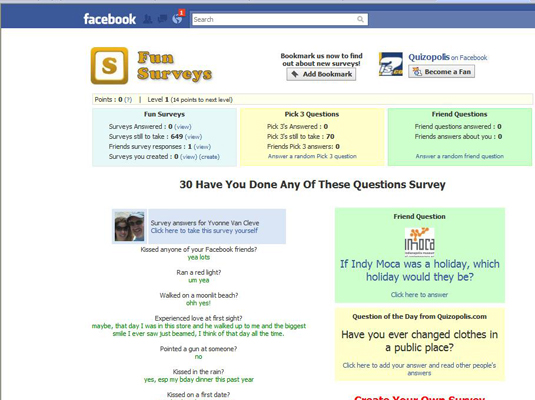
How to Conduct Market Research with Facebook Surveys

The survey is the most widely used method for collecting data in market research today, and Facebook makes it easy for you to survey your customers. Facebook surveys can be useful marketing tools for assessing proposed products, testing advertising campaigns, and engaging your fan base to keep them coming back to your Facebook page.
image0.jpg
Your goal in conducting a survey is to get as many completed surveys as possible. The number of completed surveys that many studies aim for is 100 or more. Any fewer than that is sometimes considered statistically invalid.
Of course, the response rate on your survey depends on the content that you include in it, as well as how you conduct it. The following basics can help you create a successful Facebook survey:
  • Keep your survey short. When drafting your survey, brainstorm as many questions as you can to be sure that you cover all the bases. Then review the questions and determine the essential ones for your goals. Keep only these essential questions and as few additional questions as possible.
    There is an inverse relationship between the number of questions in your survey and the number of complete surveys you will receive, so the shorter the survey the better!
  • Write down the expected outcome. This trick is critical for helping you decide whether a question is essential. Try to write the expected press release headline, such as “Nine out of ten dentists prefer Crest to any other toothpaste.” It not only helps you qualify the question for inclusion in the survey, but also gives you a frame of reference to understand how well you know the audience.
  • Start with your best question. If you’re going to get some incomplete survey data, then be sure you get your best question answered up front; don’t save it until the end of the survey. In addition, starting with your most interesting question draws in the survey takers and captures their interest.
  • Don’t sound like a survey. Don’t make questions overly complicated. Use simple words and straightforward questions.
  • Keep the choices to a minimum. Offer no more than five choices per question. Whether you are ranking an attribute from not important to highly important or presenting five multiple-choice options, try to keep the number of choices down so that your completed survey rate goes up!

Read more: http://www.dummies.com/how-to/content/how-to-conduct-market-research-with-facebook-surve.html#ixzz1LMBskKLj

Editor: Alex Rojas writes articles related with technology, social media and marketing. Sponsored by Costa Rica Hotels, Motor de reservas en linea and Travel to Costa Rica    

6 de mayo de 2011

9 Top Companies That Provide Facebook Page Management Tools

Facebook has been building out its Pages product for businesses, brands, and celebrities since last year — and as the site has boomed to well over 300 million people, Pages have become an increasingly important way for any organization to reach users. Sensing opportunity, a number of companies have been starting up or expanding to provide services for Page owners.
Pages, as opposed to personal profiles, are designed for public conversations between fans and celebrities, companies, non-profits or other people and organizations. The companies that develop products for Pages generally tend to provide a customizable suite of services, including engaging applications like polls and quizzes, moderation tools, and analytics. Conceptually, this is an extension of the online marketing products industry that serves web sites, and similar in some ways to the range of products that have also been coming out for microblogging service Twitter.
Below, we’ve provided brief descriptions of 9 top page services companies, including the specific types of services they provide. Please note that neither the list of companies nor the services they provide are complete. This is rather a snapshot of what we’re seeing in the industry now. Here are the companies, in alphabetical order:
Buddy Media

Buddy MediaBuddy Media was originally focused on creating a loyalty program called Acebucks, then became an application developer and advertising network, then followed the growth of pages by creating a platform that offers a range of services to brands, listed below. It now has 40 people in New York, and it has raised $8 million to date from a who’s-who lineup of social web investors. Features include custom pages, custom apps, and custom Facebook Connect integration, Twitter monitoring, targeted Facebook advertising campaigns and analytics. It was worked with a large and diverse group of well-known brands including: New England Patriots, Starwood Hotels, Busch, Fox News and Reebok. More recently, the company launched a custom page for the Twilight series that includes polls and virtual gifts.
Context Optional
Context Optional Social network application development and social media strategy_ Facebook Applications, Facebook Pages, Facebook Connect, and the iPhoneIn business since 2006, San Francisco-based Context Optional has a long list of big clients, and competes with Buddy Media in many areas. Clients include Travel ChannelPalm, Smart.fm, Electronic Arts, Microsoft, Miller and Absolut. The company has developed some of the formative branded apps and app-page integrations on Facebook. It recently launched a new set of tools for page moderation late last month. Other features include custom apps and Connect integration, targeted Facebook advertising campaigns, apps for the iPhone and other platforms, brand monitoring services for Facebook and Twitter, and analytics.
Fan Appz

Fan AppzFan Appz has been a bit quieter than some of the other companies on our list, but also makes a suite of applications for page owners. These include an app for making a top 5 list, another for making polls, and a third for making quizzes. Page owners can add any of these apps within their page interfaces, via Facebook’s admin settings; celebrities like basketball player Rajon Rondo and comedian George Lopez, as well as the movie New York, I Love You. It has raised an undisclosed amount of money from undisclosed investors.
Involver

Complete Brand Marketing on Facebook | InvolverSan Francisco-based Involver focuses on building custom applications for big brands, with a range of multimedia, polls, and other features. In April, it announced a deal to sell content in branded apps in pages for Us Weekly and a range of other media publications. Last year, it has raised $1.44 million in a first round of funding from angel investors. It has also running surveys, polls, and other features with clients like Domino’s.

LiveWorld

Social Networking and Community Solutions — LiveWorldAlready an established provider of community and moderation tools for major brands on the web, the San Jose, Calif. company only moved on to Facebook a few weeks ago. It offers a forums app, a question-and-answer app and a third app that solicits users ideas; the company also provides a range of moderation, analytics and consulting services. While it works with eBay and many other top companies on the web, its first and so far only announced Facebook customer is Campbell’s Soup.
theKBuzz
thekBuzzBased in Glendale, New York, the company has traditionally focused more generally on word-of-mouth marketing, including consulting services. On Facebook, it offers a range of services for large and small clients. One set of features is called theFaceLift, and as the name suggests, comes with a long list of detailed features for anyone just starting a page, like customized apps. Additional services include daily page monitoring and monthly reports about things like responses to content and fan acquisition. A long list of clients ranges from             1-800-Flowers begin_of_the_skype_highlighting            1-800-Flowers      end_of_the_skype_highlighting       to Uno Chicago Grill to Queens Chamber of Commerce.

Vitrue

Vitrue We make brands socialThe Atlanta, Georgia company has a few different sets of software services, some of which also integrate in to Twitter. One is called the “Social Relationship Manager” and it includes ways to customize Pages, plan a schedule of marketing efforts on the page, as well as measure and moderate Page activity. Another, the recently-launched “Fan Management System,” lets a large organization create and manage sets of federated pages for local parts of the business; it includes both a central administrative tool and a customizable interface for individual pages. And, the company has free-standing applications designed for pages, including polls, quizzes, email sign-ups, and more. Clients include Ford, AT&T, MTV, and recently this interesting Yoplait fundraiser. It has raised a total of $12.2 million in funding from venture investors as well as Comcast.
Votigo
Video Contest, Video Contests, Photo contests, online promotionsFocused on making viral photo and video contests for social media in general, this Lafayette, Calif. company provides a range of customizable features for these contests on Facebook. Pages owners can create custom apps, add the app to their pages, upload their own videos, moderate comments and track usage with an analytics feature. Clients have included Simmons Beautyrest and Kohl’s. The company has raised $1.27 million from Headwaters Holdings.
Wildfire

Interactive Promotions for Brand Marketing by Wildfire Promotion Builder | Wildfire Interactive, Inc.This small Palo Alto, Calif. company focuses on building customized promotion apps for brands, including sweepstakes, contests, coupons, giveaways, and more. Back in 2008 its founders were running a travel adventure company at the time, and were looking for a better way to promote the company on Facebook — them solving their own problem led to creating this company, the story goes. The company was an fbFunder Facebook incubator winner earlier this year, and has been used extensively by Facebook itself to offer app and promotional contests. Other clients include Pepsi and Red Bull.
Learn more about building your brand and growing your audience with Facebook Marketing Service Provider Directory, and the rest of our comprehensive guide to marketing on Facebook. The Facebook Marketing Bible is available at FacebookMarketingBible.com

Fuente: http://www.insidefacebook.com/2009/11/30/9-top-companies-that-provide-facebook-page-management-tools/

 Editor: Alex Rojas writes articles related with technology, social media and marketing. Sponsored by Costa Rica Hotels, Motor de reservas en linea and Travel to Costa Rica   

5 de mayo de 2011

7 Facebook Don’ts That People Do Anyway

Facebook can bring you hours of news, resourceful information and laughs galore.  There are those of you however, who need to wear a string around your finger to remind you of the don’ts on the popular social networking site.  Just because you’re given a forum in which to express yourself doesn’t mean you have to abuse the power. Can I get an “Amen?”

Just like everything else, there are some rules and regulations that you’ll need to follow while you’re on Facebook, take a look-see:

Don’t Forget To Post A Profile Picture Of Yourself

So even your chin has tripled over the years, or you might be in dire need of a few kegs of botox, or you’ve morphed into a Ma or Pa Kettle toothless lookalike, no matter what’s the excuse you’ll need to pick a pic, get it airbrushed, then download it onto your Facebook page pronto.  By not putting up a profile pic of yourself you’re automatically deemed a ‘fright’ by default!

Don’t Nag

I’m sure you’ll get a few boo-hoos from a handful of friends when you ask them to support your trichotillomania cause.  But please know, that for the most part, people don’t want you flooding their inboxes with ’causes.’  Understand, far too many people are just indifferent and your trying to rekindle some facet of empathy is a ‘lost cause!’

Don’t Be A Promiscuous Friender

In other words, don’t be a Facebook whore!  Just picture yourself getting a ‘friend’ request from someone who you don’t, or barely know.  How many times have you pinched your nose, closed your eyes, winced, then hit that ’allow’ button to let that unwelcomed person into your arena of friends?  Horrible feeling, isn’t it?  So why inflict that kind of pain and discomfort on someone else!  Besides, why would you want a gaggle of intruders hogging up your news feed?

Don’t Invite Folks To An Event If They’re Out-Of-Towners

Why would you bother to send out invites for folks to see you toot your horn at the local dive on the very same day of the gig, if they live in Alaska and you live in Vermont?

Don’t Post Anything That You’ll Live To Regret

Totally avoid posting pictures or status updates that will live in infamy.  Words to live by…if you can’t write something with a Sharpie then don’t write it, the same concept applies to Facebook.  Get your common-sense filter into gear before you post anything that can come back and kick you right in the butt.  And word to the wise…don’t even think about drunk posting, knock yourself out with some contraption before you do.

Don’t Post Boring Status Updates

Who cares that your cat Tabitha died five years ago and you still put flowers on her grave once a month.  Why would you profess your undying love all over your Facebook page for a guy you dated only twice, ten years ago, who drop-kicked you to the curb?
Do you really think your ‘friends’ need to know every single detail about those monthly festering cystic pimples that you get on your face with every menstrual cycle?

Don’t Humiliate Any Of Your Friends

Don’t post a picture of your cousin Fred who is all hugged up with your co-worker Jenyne, when he has a wife at home, who is your Facebook friend!  Think twice about possibly getting a ‘friend’ fired, divorced or even excommunicated!  Friends, don’t get friends into hot water!
Are you guilty of committing any of these don’ts?

fuente: http://www.allfacebook.com/facebook-donts-2011-05

Editor: Alex Rojas writes articles related with technology, social media and marketing. Sponsored by Costa Rica Hotels, Motor de reservas en linea and Travel to Costa Rica   

4 de mayo de 2011

How To Manage A Facebook Wall In Any Situation

Do you ever find yourself at a loss about how to respond to wall posts?

Well, Buddy Media has the answers for you in a report called “How Do I Respond To That? the Definitive Guide To Facebook Publishing And Moderation?”
At first glance it seems like a lot of common-sense advice you might have already learned from general customer service experience, but then you see important reminders like this one:
Managing user-generated content on the Facebook wall is a full-time job. If your guard is down for as little as 24 hours, you might end up with an unmanageable queue of messages that need responding to.
That includes weekends, evenings and holidays: People are on Facebook around the clock and year round, and it’s unrealistic to expect them to confine their complaints or other comments to conventional business hours.

Complaints

Buddy Media recommends that you try to anticipate possible complaints and plan a response strategy ahead of time, so that you can reply as quickly as possible to any gripes posted on your wall.
The sooner you can react to a complaint, the greater the chance you’ll pre-empt follow up complainers that will make the issue look much worse than it really is. You want to avoid having to respond to multiple posters complaining at the same time, as they will all feed off each other and possibly spread misinformation.
Don’t make the mistake of replying to complaints selectively — many admins and brand managers try to avoid the more controversial posts thinking it will be more diplomatic. The “we won’t dignify that with a response” attitude backfires online. Respond to every single gripe, because any unanswered party could interpret your nonresponse as an added insult and proceed to blow up.
Buddy Media recommends that you address each complainer by name when you respond. Offer a humble and apologetic explanation that resolves the problem. Supply links to relevant information. Also, try follow up with the complainant, either directly or right on the wall — the latter will look really good to everyone else — within 24 hours if possible.

Spread Positivity

Buddy Media says that it’s just as important to respond to positive posts as negative ones. Compliments by users don’t just show up on your own wall, but also appear on the poster’s news feed and that of their friends. Every time you respond to a post, that also goes out to everyone’s news feed.
So try to come out with an affirmative reply to every nice thing that goes up on your wall — let people know you are listening. Again, address each poster by name, and use language that reinforces positive feelings about your brand. Try to engage the happy posters so they reply in kind with more positivity, further populating people’s news feeds with goodness.

Requests For Information

Buddy Media calls this area of communication a no-brainer, only because you probably have the answer to the user’s posts right at your fingertips. So all you need to do is try to move quickly with the response so you look attentive.
The consultancy says you ought to think of these requests and your answers as a bonding exercise, a way to make the fan feel like he or she is a part of things upon receiving the answers. Make sure you address everyone by their name and use a friendly yet respectful conversational style.
The only way you can mess this area up is if you accidentally supply misinformation. But even if that happens, you can rectify that by apologizing for the mistake and offering the correct data. Then follow up later to make sure the person has what he or she needs.

Guidance And Advice

Some people request information that requires an answer not as readily available to you — maybe it calls for a more involved response, or even some opinion. What this poster needs is advice and guidance. Play your cards right and these conversations can yield the positivity that Buddy Media recommends you promote.
This takes more thought and consideration –plus a reassuring and complimentary tone. It might call for a telephone follow-up that you can suggest by giving out your phone number to the person on the wall or via a direct message.
Be mindful of potential legal issues here. Make sure your answers to these questions protect you from litigation. Consult your company’s attorney for some stock information about different scenarios, and also check with the lawyer about topics that come up anew.

Diffusing Frustration With Technology

People can get frustrated with even the best technology, and if more than one customer service representative gets involved in trying to help someone with these issues, frustrations can mount instead of subside.
The best way to contend with these situations is to have responses prepared ahead of time. Anticipate likely technology challenges and prepare answers to questions ahead of time. And that should include a list of resources with additional information on the subject.

Managing Conversation Threads

Some conversations are easier to manage than others, and if you’ve got several of them going at once, well, it gets hard. So make sure you have enough staffing helping you manage it all. If you don’t, you’ll risk missing something that could become a headache.
You have to prioritize when managing multiple conversations. Don’t move so quickly that you make mistakes, especially because you’re going to face a mix of positive and negative posts. You’ll want to respond to the negative posts first with personalized and complimentary statements. When confronted with postings that are inflammatory, derogatory or profane, go ahead and delete the post. Consider also blocking the poster so he or she doesn’t come back to post more negativity.

Keeping Negativity And Profanity At Bay

Create a written policy about what types of posts you don’t want to receive, and place it prominently on your wall or page — that ought to reduce negativity and profanity a great deal.
If you’re still getting negative and profane posts, and it seems like not enough positive ones are coming your way, ask friends to help out by posting something nice on your wall to start a positive thread.
Know that you don’t have to let everyone comment on your wall — that’s why the link for blocking a user is there. Don’t feel guilty about using it. You can now reinstate people who you’ve previously blocked, so you could even tell someone you’re blocking that he or she can come back later.
Readers, how often do you see Facebook page conversations needing intervention by admins and not getting it in time to do damage control?

Editor: Alex Rojas writes articles related with technology, social media and marketing. Sponsored by Costa Rica Hotels, Motor de reservas en linea and Travel to Costa Rica  

3 de mayo de 2011

5 Facebook Privacy Tips You Need To Know Now

In honor of national Data Privacy Day, we’ve decided to list some of the most important things that users should know about Facebook Privacy. We’ve covered the topic extensively over the past couple years (including our new Facebook privacy guide), but there’s never a bad time to remind people of how to protect themselves online. In this article you will learn some of the most useful ways to protect yourself on Facebook and some of our most important guides.

Facebook’s Granular Privacy Settings

Granular Facebook SettingsFacebook uses a system called “granular privacy settings” to give Facebook users complete control of their information. The way that the system is supposed to work is that users can control the visibility of anything they publish on the site. While there is ongoing debate about certain information which is not completely private, there are plenty of settings users can use to limit the visibility of their content. As pictured to the right, the basis of Facebook privacy is five core settings that you will see throughout the site:
  1. Everyone – Everyone literally means everyone. This content will be visible to everybody on the internet. While companies and organizations want their content to be completely public, a lot of users prefer to have their content restricted. By selecting everyone you will have no restrictions on your information or content.
  2. Friends and Networks – This setting will only be visible if you are part of a university or professional organization. If you are not a member of a specific network, this will not be visible. By selecting this option, your information will be only be visible to your friends and members of the networks that you are part of. If you are not a member of a network, there’s no need to worry about this option.
  3. Friends of Friends – I’m not sure why you would want to select this option, however some users want to restrict content to a partially restricted network. While not everybody will be able to see your information, anything to decide to apply this setting to will be visible to your friends and all of their friends.
  4. Only Friends – This setting is pretty straight-forward. Any user that is your friend will be able to see the content you are selecting this for.
  5. Custom – Want to manually select individual friends that can view your information? By using the custom option, you will be able to select individual friends that can and cannot see your information.
You can now go through the privacy settings area on Facebook and you will be able to apply these settings to any of your personal information.

Understanding Friend Lists

Friend Lists IconWhile we previously published a guide to Facebook friend lists, we thought it would be useful to remind users about friend lists. While only a fraction of users take advantage of friend lists, the feature is extremely useful when trying to separate your various social or affiliation groups. For example, you may have work contacts, family members, and close friends all connected to you on Facebook. As we previously wrote:
The purpose is to easily group your friends, set custom profile settings based on your connection, and to be able to more effectively browse the site.
There are two primary places to view your friend lists: the homepage and the friends page. By default, Facebook applies any networks you belong to as friend lists. They then allow you to create your own lists. In the image to the right, you can see a few of the friend lists I created for myself. The “American” list was automatically generated by Facebook and displays all of my friends who attended American University. I created a list “AllFacebook” to signify that I met the user through this blog. Members of that list are then limited to accessing specific contact information (I don’t want someone I met on my blog to know my home address).
I grew up in Arlington, Virginia. As such, I have a number of friends that I went to elementary, middle, and high school with. I have grouped these individuals into the “Arlington People” list. I have relatively unrestricted privacy settings for members of this list as I am personally close to the majority of them. If you want to take the time to configure your own friend lists, definitely check out our friend lists guide.

Protect The Content You Publish

Facebook Publisher Privacy
Whether it’s the photos, videos, or status updates that you publish, you have the ability to control the visibility of all that content. While we go into extreme detail in our new Facebook privacy guide about protecting your content, it’s important to highlight the publisher privacy settings. Any content that you publish via the Facebook publisher (pictured above) has privacy settings applied to them using the granular settings highlighted earlier.
For many users this has become “Everyone” by default so it’s important to take note of this setting with every piece of content you publish. You can also configure the settings for photos and videos you are tagged in via the profile privacy settings page. We’ll avoid going into too much detail here as it has been explained for the most part but if you want more information about restricting the visibility of the content you publish, check out our new Facebook privacy guide or one of the articles listed below.

Make Your Contact Information Private

One of the most important things to protect is your contact information. Your phone numbers, email addresses, and even home addresses can be stored and used for malicious purposes. If you want to protect yourself on Facebook, limiting the visibility of your personal contact information is probably the single most important thing you need to do. There are two places to control your the visibility of your contact information: the contact privacy settings page and the info tab of your personal profile.
From the contact privacy page, you can customize the contact settings as much as you’d like. I would tend to restrict those individuals you don’t know well from viewing your contact information. Facebook has a default “Limited Profile” list (as pictured below), however you may have other custom friend lists you’d like to apply. I’ll let you determine who you’d like to limit your information to.
-Contact Privacy Settings Image-
A best practice that I use is to not store your home address on Facebook. Also restrict those people you don’t know from viewing your email address and phone numbers. If you modify your privacy settings from the info tab of your personal profile, you will be able to select privacy settings for every contact item (pictured below). This gives you complete control of your information.
-Contact Information Screenshot-

Fuente: http://www.allfacebook.com/facebook-privacy-tips-2010-01
Editor: Alex Rojas writes articles related with technology, social media and marketing. Sponsored by Costa Rica Hotels, Motor de reservas en linea and Travel to Costa Rica 

1 de mayo de 2011

Facebook Updates Groups: What’s New

Facebook announced Monday updates to its Group feature that aim to make the platform a better place to share content within small networks.
Since private photo sharing platform Path and a host of group messaging companies have highlighted the importance of sharing within small groups, it seems Facebook is taking selective sharing more seriously as well.
In October, one month before Path launched, Facebook unveiled a new Groups feature that creates shared spaces where members can participate in communal group chats, email lists, document sharing and photo tagging.
Now the platform is improving this feature, as well as launching a “Send” button that creates a more specific sharing alternative to the all-friends “Like” button.
You can expect to see these updates on Group pages starting Monday.
  • Admin Control: The Group admin now has an option to maintain new member approval power.
  • Questions: You can now use Facebook’s new poll-like Questions feature within groups.
  • Photo Albums: Members of Groups can already share photos with each other easily. Now they can share entire albums the same way.
  • Group Search: Like Gmail, you can now search through the posts in a Facebook Group to easily find content. This feature will roll out slowly throughout the next week.

What do you think of Facebook’s new Group features?

Fuente: http://mashable.com/2011/04/25/facebook-updates-groups/

Editor: Alex Rojas writes articles related with technology, social media and marketing. Sponsored by Costa Rica Hotels, Motor de reservas en linea and Travel to Costa Rica 

27 de abril de 2011

15 consejos para optimizar el uso corporativo de Xing, Twitter y Facebook

Cada vez más empresas caen rendidas al amplio abanico de posibilidades que pone a su disposición el denominado social media marketing. Muchas se estrenan en esta nueva modalidad de la mano de Xing, Twitter y Facebook, pero la entrada en estos canales no tiene por qué ser sinónimo de éxito. La revista Acquisa proporciona las pistas para triunfar en estas tres redes sociales con los siguientes 15 consejos:
Xing
1. Determinar con claridad los objetivos que se marca la empresa al embarcarse en Xing. En este sentido, conviene identificar previamente a aquellos contactos y grupos que más útiles pueden resultar a la compañía en términos corporativos.
2. Mostrar un comportamiento discreto y mostrar interés por otros miembros.
3. Regirse por el principio de “dar y recibir”. Cuando alguien nos pide ayuda, ese alguien puede convertirse en el futuro en un contacto valioso.
4. Dar prioridad a nuestros contactos y ofrecerles un tratamiento personalizado en función de su propia importancia.
5. No desperdiciar fuerzas en vano. Sólo los contactos verdaderamente importantes merecen nuestra total atención.
Twitter
1. Elegir un nombre adecuado para el perfil de la compañía en Twitter, a ser posible el mismo nombre de la firma, si es que éste se encuentra disponible.
2. Personalizar el perfil de la empresa en Twitter, mediante un logo, un fondo apropiado, etc.
3. Twittear sólo información interesante y relevante. El mero “autobombo” no interesa a nadie.
4. Publicar tweets con regularidad (al menos tres a la semana).
5. Incluir el link a la web de la compañía en el perfil de ésta en Twitter.
Facebook
1. El nombre de la página de fans de una compañía en Facebook debe corresponder con su nombre real.
2. Dar a conocer la página de fans entre los trabajadores y círculos de conocidos de la compañía para ganar así en número de seguidores.
3. Asegurarnos de que la página de fans de nuestra compañía en Facebook es fácilmente localizable en los motores de búsqueda.
4. Generar contenidos interesantes para el usuario y fomentar la discusión.
5. Publicar actualizaciones con regularidad.


Fuente: http://www.marketingdirecto.com/actualidad/social-media-marketing/15-consejos-para-optimizar-el-uso-corporativo-de-xing-twitter-y-facebook/

Editor: Alex Rojas writes articles related with technology, social media and marketing. Sponsored by Costa Rica Hotels, Motor de reservas en linea and Travel to Costa Rica