Buscar este blog

Mostrando entradas con la etiqueta foursquare. Mostrar todas las entradas

24 de mayo de 2011

Location-Based Services: Foursquare vs. Facebook Places

Ask any marketer about trends for 2011 and you’ll undoubtedly hear the phrase “location-based services.” However, among Foursquare, Facebook Places, SCVNGR, Gowalla and many others, marketers have a lot to choose from.
In this article we’ll cover the two major players—Foursquare and Facebook Places—and see how they stack up.

What are location-based services?

Location-based services allow users to connect with others based on their current locations. In most cases, people use their smartphones (iPhone, Android, Blackberry) to “check in” to businesses like restaurants, bars and stores they visit. These locations are then broadcasted to their online friends.
Many of these services also have a gaming component, allowing members to compete against one another or to collect rewards (like online badges) for their activities.
foursquare badges
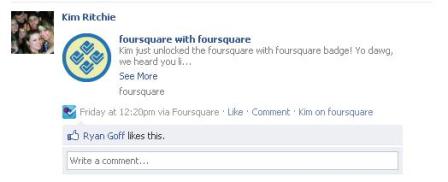
Foursquare offers badges that are unlocked as an incentive for checking in at local venues and events.
So why do marketers love location-based tools so much?
A few reasons:

#1: Free word of mouth

Because each check-in is broadcasted to a user’s friends, there’s natural word of mouth advertising that occurs through the site. Marketers’ theory is that if users see their friends check in to a location, they may be more likely to visit.

#2: Reviews

Most location-based tools allow users to write reviews of the places they frequent. These reviews are then shared with other users who check in to those locations. This can have a real impact (either positive or negative) for businesses hoping to be discovered by new customers.

#3: Specials

Sites like Foursquare and Facebook Places allow businesses to run specials that are unlocked by users who check in to their locations. For example, a pizza place could create a special that gives free breadsticks to customers who check in five times. These specials encourage frequency, first-time visits and competition among customers. More on this later.
Now let’s compare the two major players—Facebook Places and Foursquare.

Users

In 2010, Foursquare announced that it had more than 6.5 million members worldwide.
Facebook, on the other hand, said that as of October 2010 (just two months after its launch), more than 30 million had tried its Places service.
It’s unclear how many of these users can be considered active versus simply setting up accounts. But based on download volumes, it’s clear that Facebook made a big splash upon its launch.

Activity

In 2010, Foursquare claimed that its users checked in to locations more than 380 million times.
Facebook has not yet released its Places check-in numbers.
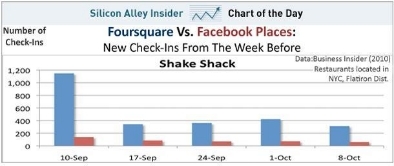
But Business Insider (2010) recently ran a one-month comparison between the two services, looking at the difference in total check-ins at several popular NYC restaurants.
foursquare vs facebook
Business Insider found that five times as many users checked in on Foursquare than Facebook during a one-month period at a NYC restaurant.
Foursquare overwhelmingly dominated in the experiment, with 5x (or more) the number of check-ins in some cases. It’s unclear if these numbers apply to all businesses in all cities, but Foursquare users appear to be far more active than Facebook Places users.

Deal Options

As mentioned, both Foursquare and Facebook Places encourage businesses to create specials that reward users for checking in to their locations. But options for these specials vary slightly per site.
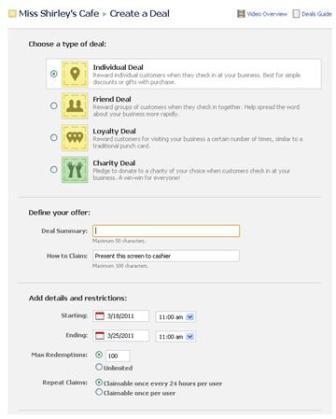
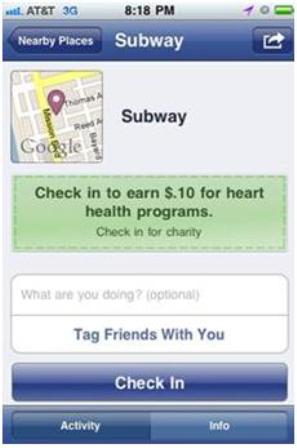
For example, as part of its “Charity Deals,” Facebook lets businesses donate a certain amount of money per check-in. This type of special is not currently available through Foursquare.
subway
Subway recently offered a Charity Deal on Facebook, offering $.10 per check-in to promote heart health.

deals
Using Facebook Places Deals, businesses can choose to offer one of four types of deals and can set restrictions on date, time and availability of the deal.
Foursquare, on the other hand, allows businesses to run what’s known as “Mayor” specials. These deals reward the individual who has checked in the most to a location.
Foursquare is also in the midst of expanding their check-in deal options for businesses to better compete with Facebook, so you’ll begin to see a lot of overlap between the two.

Reach

One of Facebook’s key advantages over Foursquare is its large, built-in network of users (600 million+ of them!). And because Facebook launched long before Foursquare, many of its users had time to build up their own networks of friends.
In fact, the average Facebook user is connected to 130 friends. This means that on average, each Facebook Places check-in has the potential to be seen by 130 of a user’s Facebook friends.
Foursquare users appear to have much smaller networks, and thus a much smaller reach. The site doesn’t appear to disclose data about the size of its average user’s network. But anecdotally, it’s hard to find many users with more than 50 friends, meaning that each check-in may be seen by just a small group of users.

Quality of Reach

The majority of Facebook users are connected to their intimate social networks—friends, family, co-workers, etc.—while many Foursquare users are connected to those they’ve never met (e.g., Twitter followers).
From a word-of-mouth standpoint, it can therefore be argued that Facebook check-ins are more valuable than those spread strictly through Foursquare. It’s the difference between telling your best friend where you’re hanging out versus telling a complete stranger. Your best friends are going to be far more likely to trust your recommendations.

facebook check-in
Facebook check-ins are published on the user's wall and unlike Foursquare, Facebook Places allows users to tag a friend in their check-in.

foursquare check-in
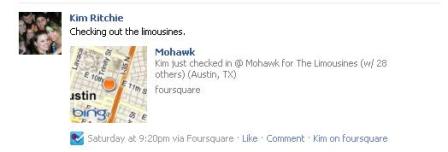
Foursquare offers the option to post check-ins to users' Facebook walls and Twitter feeds.
Please note that Foursquare users are able to share their locations to Facebook and Twitter, but very few choose to do so.

Tips

Let’s look at five tips on how you can begin capitalizing on one or both location-based services:

#1: Set goals

Looking to increase foot traffic? Want to see your regulars visiting more often? Before you launch your first Foursquare or Places special, be sure you’ve defined what you’re trying to accomplish. This will help you to better analyze your results and adjust your campaigns as needed.

#2: Educate yourself

As with most social media tactics, it’s important that you first understand the tools from a user’s perspective. Doing so will give you better insight into how and why your customers are using these tools, and may give you insight into what your competition is doing.

#3: Learn from others

Sometimes the best ideas can come from the least expected places. So before launching into a large location-based campaign, make sure you know what others are doing out there. Take a look at your competition, obviously. But also venture outside of your industry. You never know when you’re going to stumble across the idea that kicks your brain into high gear.

#4: Be creative

The biggest mistake you could make in launching a special would be to do something that’s already being done. Find something that’s going to make people turn their heads. Something that makes them say “Huh?” And, most importantly, something they’re going to tell their friends about. If you’re not excited about your deal, they probably won’t be either.

#5: Promote, promote, promote

Once you’ve launched a promotion through Foursquare, Places or any other location-based network, make sure you get the word out. These technologies are still relatively new for most consumers, so there’s a certain level of education that has to go into making these things successful. So upon launching, make sure you have in-store signage to promote your special. Send out an email blast with information on how to use the sites. And if your special is unique enough, send information out to local bloggers and media.
There’s no cost associated with setting up a profile on Facebook Places or Foursquare, so if you’re looking to launch a location-based promotion, there’s no harm in giving both a try to see which service generates more buzz and drives traffic to your business. Just consider the above tips before you launch your campaign.

 Editor: Alex Rojas writes articles related with technology, social media and marketing. Sponsored by Costa Rica Hotels, Motor de reservas en linea and Travel to Costa Rica     

29 de abril de 2011

HOW TO: Start Marketing on Foursquare

There are more than 8 million users on Foursquare — up from just 1 million a year ago. This explosive growth means one thing — you might want to get your business on Foursquare. After all, Radio Shack reported that the average Foursquare user spends 3.5 times more at its retail shops than the average customer.
The most recent iteration of the location-based app, Foursquare 3.0, expanded the features and made it much easier for businesses to jump on the bandwagon and start marketing. Best of all, it’s free. Foursquare is winning the location-based app game because it has the biggest user base [aside from Facebook Places] and it pleases both parties — customers want to be recognized, and businesses want to know who their biggest fans are. Mashable spoke with Eric Friedman, Foursquare’s director of business development, about how businesses can get started on Foursquare and the various marketing options they have available to them.
“Foursquare works well when a moment of commerce happens,” says Friedman. And commerce is exactly what business owners are looking for. Plus, as smartphones penetrate the U.S market (currently, about a third of U.S. consumers have a smartphone), there will be even more Foursquare users.
“We’re on every single platform that’s out there, so there’s never been a better time for businesses to start using Foursquare,” Friedman says. “There’s no cost, it’s easy and it works.”
Want to get started? Below, Friedman walks Mashable through all of the steps.

Brands With Brick-and-Mortar Locations


“[Small businesses] have the same resources available to them as a super large QSR, an Italian restaurant or a Starbucks, and that’s a really powerful tool,” says Friedman. He’s referring to the Foursquare for Business Merchant Platform, which creates an even playing field for restaurants, retail stores, museums, mom-and-pop shops and other businesses. The owners can claim venues on Foursquare, establish specials and analyze data on Foursquare’s dashboard. Here’s how to do it.

Claim Your Venue


To claim your venue, search for it on Foursquare.com. It’s likely that someone has already created your venue to check into it, and you can claim it by proving that you own it. If you can’t find it or you are opening a new venue, click “Add a new venue to Foursquare,” which is at the bottom of the page. Fill out the information in the wizard. Once all the information is plugged in, your venue page will come up. Click “Claim here” on the venue page.


Foursquare will ask you a few questions about the business (i.e. “Is this a chain?”) and whether you are authorized to claim the venue. Then it will ask how you’d like to verify your ownership — either by phone or by mail. If you verify by phone, Foursquare will call you and provide a 4-digit PIN that you can enter on the site. If you opt to verify by mail, the PIN will be sent via postcard. Once you’re verified, you will also receive a Foursquare window cling so customers know you are a Foursquare-friendly establishment. (Fear not, efficiency lovers: If you have numerous locations, you can verify in bulk.)


Adding Specials


Once you’re verified as the owner of a location, you can use Foursquare’s Merchant Platform to create specials to reward your customers. The method for creating specials is pretty self-explanatory, and the wizard walks you through each step as you create your special. You can have two specials running simultaneously at a given location. Foursquare 3.0 introduced a new group of specials:
  • Swarm Special. A special is unlocked when a certain number of people are checked in. For example, an ice cream store can give away a free scoop of ice cream when 10 people are checked in at once. You can set a limit for how frequently this special can be unlocked so that you don’t give away too much product.
  • Friends Special. A reward for when friends check in together. You can specify how many friends need to be checked in and what they receive for being checked in.
  • Flash Special. A special for the first X people who come at X time. It’s great way to incentivize customers to stop by during your slow hours.
  • Newbie Special. A reward for people who check in to your business for the first time. Offering a reward for a user’s first checkin — even if it’s a small one, like 10% off or a free side dish — is a great way to start a relationship with a new customer.
  • Check-In Special. A reward for every single checkin. Restaurants can offer a free soda or a discount, while retailers might offer a few dollars off a purchase.
  • Loyalty Special. A reward for a user’s third, fifth, seventh checkin — you determine the interval — to incentivize customers to return a few times to cash in on their special. Loyalty specials can be recurring (“every three checkins”) or not (“on your third checkin”).
  • Mayor Special. The mayor is the person who has checked into a venue more than anyone else. In theory, he is your best and most loyal customer. As such, he deserves a prize, whether it’s a discount, a free t-shirt, a beer or a meal on the house. Mayors tend to be proud and protective of their mayorship, and you might even see some turf wars when the mayorship changes hands. You can offer something whenever a new mayor earns the crown, or you can offer a daily reward for the mayor.
Now that you’ve seen the offerings, click the special you’d like to do and fill in the requirements for unlocking the special. Once you finish entering the stipulations and select what venues will feature the special, it will be live (though it won’t show in the “Nearby Specials” filter until a human verifies that the special is legitimate). There are two one-sheets you can print off to explain Foursquare — one for employees, so they know how to recognize a special, and one for customers, so they know how to get in on the Foursquare action.


Dashboard Analytics


Once you’ve claimed a venue, you can access a dashboard of analytics that show how many checkins you’re getting each day, the time of each checkin, as well as a breakdown of the genders and ages of your Foursquare customers. Plus, there are two lists: one of your top visitors in the past 60 days (your most loyal customers), and one of your most recent customers, along with their Twitter handles (so long as they provided that info when they logged into Foursquare). In my experience, only about 25% of people push their Foursquare checkins to Facebook and Twitter, so having access to the Twitter handles of loyal and new customers provides businesses with an opportunity to reach out, follow up and see how a customer’s experience was. That personal touch is likely to bring customers back, and it may also turn that person into an evangelist for your business.
Also, remember that Foursquare is flexible, and you can make changes in real-time. You can run two specials simultaneously at each venue, so experiment and figure out what works for you and your business. With the right campaign, you could actually be saving money — Friedman says several business have stopped advertising altogether, since Foursquare allows them to reach customers for free.

Brand Pages


But not every business has a brick-and-mortar location — look at MTV and Zagat, for example. If your company is a brand without a physical presence — a magazine, a TV channel, a university of a consumer packaged good — you can use Foursquare Pages and Partner Badges to reach consumers.
Foursquare Pages are “a place for brands to have a program and have a cool way to interact with consumers,” Friedman says. The Foursquare website outlines a step-by-step process for setting up a Foursquare Page, which must be done manually (in the future, businesses will be able to create their own brand Pages). Business owners must submit a form; the Foursquare team will reply in about two weeks.
Your Page is highly customizable, and you can have a custom banner to incorporate your logo. The grey box on the right can be populated with information about your brand, along with links back to your own site or to social media sites. And of course there are tips you can leave for your followers so that when they check in to certain places, your tip pops up. The History Channel leaves factoids all over the country at places like New York’s Highline and London’s Tower Bridge, which provide context as you traverse the city. Likewise, Zagat leaves restaurant tips for dishes and cocktails.
Tips can be timeless, or they can be geared to promote an event. For example, The New York Times left tips all over Vancouver for the 2010 Olympics. Tips can be saved to a user’s to-do list, too. The Foursquare site points out tips for crafting good tips:
  • Tips can direct people to a certain place or instruct users to try a certain item. The point of Foursquare is to enhance someone’s experience in a location — if you have some insights, share them.
  • Don’t leave a tip that is obvious — try to share insider information, a secret menu item or a fun tidbit

Brand Badges


Once a brand has a Page, it can also offer badges for Foursquare users. Of course, Foursquare has its own badges that users love unlocking, including:
  • Crunked. Four stops in one night.
  • Photogenic. Checking in to three places with a photo booth.
  • Swarm. Checking in to a place with 50 other people.
But the brand badges are more self-promotional, and they’re unlocked for checking in to places and doing fun things that are relevant to your brand. (Foursquare doesn’t disclose individual badge prices, which can vary, but “$25,000 a month with a multi-month commitment” is typical.) Users must “follow” a brand on Foursquare to unlock badges, some of which include:
  • MOMA — Art Addict. Three checkins at MOMA or PS1 in one month.
  • The Wall Street Journal — WSJ Lunch Box. Two checkins during lunch at a restaurant that’s been reviewed in WSJ’s “Lunch Box” column.
  • Gogo Inflight — Mile High. One checkin while in flight.
New York Magazine recently did a Foursquare integration with its “Where to Eat 2011″ feature. Below each highlighted restaurant, users could add a restaurant tip to their to-do lists. Checking in to 5 of the restaurants in the list earns a user the Where to Eat 2011 badge, which could also unlock discounts and prizes at these restaurants.


Advice From Foursquare


Friedman has some tips for businesses about how to optimize Foursquare:
  • The best kind of Foursquare specials are those that make users feel, well, special. You don’t need to give a discount and lose your margins. Offering exclusive access to a sample sale or a special dessert that is only available for Foursquare users is a great way to get people coming back and checking in. Plus, not offering discounts means you can attract and maintain customers without affecting your bottom line.
  • Remember to utilize the fine print when you’re filling out your special.
  • Use Foursquare to grow your business — run a special during your slow times to keep a steady flow of customers all day.
  • Make sure you train your staff on how to recognize and reward Foursquare users.
  • Remember to set an end date for a campaign if it’s a limited-time offer or a one-day special.
Fuente: http://mashable.com/2011/04/27/how-to-foursquare/

Editor: Alex Rojas writes articles related with technology, social media and marketing. Sponsored by Costa Rica Hotels, Motor de reservas en linea and Travel to Costa Rica 

    28 de abril de 2011

    6 Tips for Getting the Most out of Foursquare

    The Interwebs are buzzing, and by now you’ve probably heard about a social network called Foursquare that’s apparently a big deal. So you cracked open your smartphone (or at least, gingerly removed it from its dock) and downloaded the Foursquare app. After signing up, you scrolled through the tabs and figured out how to “check in” at whatever restaurant, bar, store, or train station you happened to be at. And then you said, “Now what?”
    Just like Twitter, at first glance Foursquare may seem a bit inert. To really understand what Foursquare’s voracious user base is so excited about, you’ve got to start using it as more than just a catalog of your GPS-pinpointed whereabouts. Here are six tips for squeezing all the juicy social goodness out of this app that’s sweeping the social media world off its feet:

    1. Add Friends… Carefully


    Foursquare people image
    Using Foursquare by yourself is like playing tennis alone. The fun lasts about three seconds. In geekier terms, it’s like having zero followers and following no people on Twitter. To get value from Foursquare, your friends need to be in on the action, too. Then you can use the app to meet up, share tips, and find stuff to do with when you’re bored, among other things.
    The caveat: don’t add people you aren’t really friends with. That’s because Foursquare friends can see your GPS location, so by adopting a Myspace-style friends-with-everyone practice, you’re inviting a host of potential weirdos to meet up with you every time you check in somewhere. As founder Harry Heyman puts it, “Do you really want them to know where you are all the time?”

    Foursquare stats image
    Unlike Facebook and other social networks, friend count doesn’t show up as a profile stat. In Foursquare, you get rewarded for things you do, not people you add, so there’s really little incentive to add strangers willy nilly.
    However, when you check into a location, you’ll be able to see who else is there, which could be an opportunity to meet like-minded people and make new friends in real life!

    2. Complete Your Profile


    In order to become mayor of a venue (the user who checks in the most in the past two months carries this title), you must have a profile pic. “No faceless dictatorships on Foursquare!” Heyman says.

    Foursquare settings image
    Additionally, if you link up your Foursquare account with Twitter, your profile URL will show up on Foursquare instead of just a user number. You’ll be able to send notifications to Twitter when you check in places, earn badges, or take over as Mayor somewhere – either automatically or whenever you deem fit.

    3. Add Shouts to Your Checkins


    Instead of simply tagging yourself in different spots around the city, keep your friends in the loop by adding short messages, or shouts. You can use these to let people know they’re invited to join you, for example, or to announce what’s happening at the venue you’ve arrived at.

    4. Leave Tips and Build Your Top 12 List


    Foursquare top 12 image
    After adding a few friends, you may notice messages pop up when you check in at or near venues your buddies have been to. These are tips your friends have left. Suggestions like “try the grilled cheese” from people you trust can go a lot further than the faceless reviews you read on other city guide apps.
    Pay it forward by leaving tips yourself. This not only enhances the day-to-day experience, but helps you build your own personal top 12 list. Heyman explains, “Everyone knows something a little special. Put it out there so your friends will see it if they check in to your favorite spot.”

    5. Manage Your Push Notifications so You Don’t Go Crazy


    Foursquare check in image
    If you use Foursquare on an iPhone, you can get pinged – without getting an SMS charge from your carrier – whenever a friend checks in or shouts. However, all those messages can still be annoying if you have a lot of friends (or one friend that checks in obscenely often), don’t fret: Foursquare lets you configure ping settings for individual friends at foursquare.com/manage_friends
    You can also turn pings off entirely, either for the night or until further notice. Personal example: My wife used to go crazy when my friends would check in at 3 AM (which is often). Once I discovered the ping management feature, she lifted her Fourquare embargo, meaning I can once again go to bed with my iPhone in the same room.

    6. Stake Your Claim


    snow_4sq_mayor
    Now that you’ve got things down, it’s time to get competitive. Every popular venue has a mayor — the person who has visited the most in a given time period, and mayors are often entitled to perks like free coffee or sandwiches, depending on the place. At the very least, mayorship equals bragging rights, and many a Foursquare user has been unwittingly caught in an epic mayor battle.
    Going for mayor at your favorite spot encourages you to get out more, which is rarely a bad thing. Plus, new friendships are often happy byproducts of mayor wars.
    “Curious how close to being mayor you are at your favorite spot?” Heyman asks. “Hover your mouse over the current user’s pic on the venue page and it will show you how many times they’ve been there in the past two months. See how close you are to claiming the throne.”

    Conclusion


    Foursquare is a social network that actually gets you out of your cave and into the real world with other living, breathing people. Once you nail a few basics down, it can add exponential value to your social life. Oh, and did I mention the free sandwiches?

    Fuente: http://mashable.com/2009/12/10/fourquare-tips/

    Editor: Alex Rojas writes articles related with technology, social media and marketing. Sponsored by Costa Rica Hotels, Motor de reservas en linea and Travel to Costa Rica 

    22 de abril de 2011

    6 ways to optimize your business with Foursquare

    What is the hottest mobile trend for 2011? The answer seems obvious. It’s Foursquare, the Twitter of 2011, the leading location-based social network which, with a game aspect, encourages people to explore their neighborhoods via their smartphones, share their visits with local attractions, events and businesses and gives them rewards when they do so.

    Further than that, Foursquare, which in April 2010 reached a million users in just over a year of existence, is driving new online strategies for businesses. It offers them multiple ways to attract customers and gain qualitative and quantitative feedback on their establishment. If you own a “physical” retail business such as a shop, a restaurant, a bar, a hotel, etc,. find 6 ways to use Foursquare in order to boost your sales and increase your customers’ loyalty:
    1. Are you listed?

    First thing to do is visit Foursquare website and search for your business to see if it is already listed. If yes, make sure the information presented is correct and complete. You will need to create a personal account in order to correct your information or add your business.
    2. Offer “Specials”!

    Businesses can offer discounts or special offers to reward people who “check-in” their establishment and develop stronger relationships with their customers. There are many ways to treat your customers with Specials: Some of them are the “check-in specials” that help you reward the customers that reach a specific number of visits or the “frequency-based specials”.
    3. Give tips!

    You can give your customers tips in order to enhance their experience within your business. If you own a restaurant, you can leave tips about the day specials, the best time to come for a drink, the things to do in your establishment, etc. It is definitely a fun and creative way to attract customers!
    4. Learn about your business

    FourSquare offers business analytics that makes it possible for business owners to see how customers interact within their businesses. Additionally it helps them improve their services, since they can read the reviews about what customers like, what tips and comments they leave, understand their needs etc.
    5. Reward Mayors!

    The person who “checks_in” the more frequently in your business in a period of two months, reaches the “Mayor” status. Offer the Mayor something really special to reward him for his loyalty, like “free drinks” or give him the power to be a creative part of your team by choosing the music you will play or a theme for a special night, etc. Not only you will make your Mayor happier, but also you will increase the competition amongst your customers in order to de-throne the current mayor and take his/her place!
    6. Interact with your customers

    Foursquare gives you the opportunity to get closer than ever with your customers, since, not only you will discover your best customer by checking his Mayor status, but through the game, you will interact with all your customers and acquire a friendly reputation.

    Most of all, always keep in mind that Foursquare is a game which gives businesses the chance to be creative and build relationships with the customers. If you adopt the Foursquare philosophy, your customers will inevitably talk about your business and reward you back for your services.
    Fuente: http://www.webseoanalytics.com/blog/6-ways-to-optimize-your-business-with-foursquare/